
Browse the Help Center
Track acknowledgements
Read the transmittal register at a glance, filter to outstanding and overdue responses, and chase stragglers.
1 min read
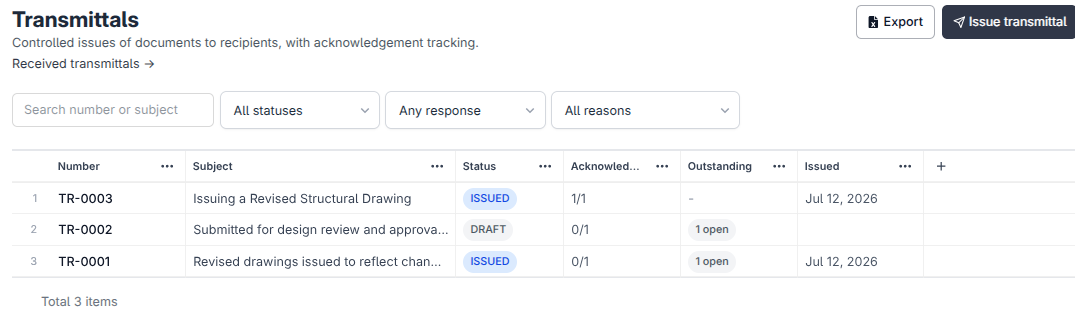
Issuing a transmittal is half the job. The other half is knowing who has acknowledged it and who has gone quiet. The project transmittal register shows both at a glance.
Read the register at a glance
In the sidebar, open Projects, open your project, then click Transmittals. Each row tracks one transmittal:
| Column | What it shows |
|---|---|
| Number | The transmittal's unique number in this project. |
| Subject | What you called it when you issued it. |
| Status | Issued, Draft, or Recalled. |
| Acknowledged | How many recipients have confirmed receipt, out of the total (3 of 8). |
| Outstanding | How many responses are still open, with an Overdue flag when the response date has passed. |
| Issued date | When it went out. |
Filter to what needs chasing
- 1
Use the Status filter to narrow to Issued, Draft, or Recalled transmittals.
- 2
Use the Response filter to show only Outstanding, Overdue, or Acknowledged transmittals. Overdue is usually the list you want first thing in the morning.

- 3
Use the Reason filter to focus on one kind of issue, such as everything sent for review.
Chase the stragglers
A transmittal turns Overdue when its Response required by date passes with responses still open. Send a reminder from the transmittal to nudge everyone who has not responded yet. The reminder goes only to the outstanding recipients, so the people who already acknowledged are left in peace.
Export to Excel
Click Export to Excel to take the register, with its acknowledgement counts, into a spreadsheet. Handy for progress meetings and monthly reports.
Looking from the document's side?
Every document details page has a Distribution tab showing which transmittals carried that document. It answers "who has this drawing?" without opening a single transmittal.
See it on the platform
Document controlWas this page helpful?
Need help? Contact support.
See what shipped in the changelog.
Questions about pricing? Talk to sales.
Something down? Check the platform status.
Found a bug in the product? Report an issue.
Missing something? Request a feature.