NEWTry every module free for 14 days. No credit card, no setup call.
fluxems
IndustriesHelpBlogPricingChangelogAbout
OperationalLog inStart free trial
/
Help Center home
Getting started
  • Welcome to fluxems
  • How fluxems is organised
  • Create your first project
  • Invite people to your workspace
  • Upload your first documents
  • Customise your dashboard
Documents
  • The document register
  • Understand versions and revisions
  • Upload a new revision
  • Set a revision as current
  • Document statuses explained
  • Update a document's status
  • Review and approve documents
  • Suitability, disciplines, and references
  • Confidentiality levels and private documents
  • Search, filter, and star documents
  • Browse files with Explorer and folder templates
  • Document workflows and action requests
Transmittals
  • What is a transmittal?
  • Issue a transmittal
  • Respond to a transmittal you received
  • Track acknowledgements
  • Recall a transmittal
RFIs
  • What is an RFI?
  • Raise an RFI
  • Answer an RFI
  • Track RFIs to closure
Projects and delivery
  • Project overview and activity
  • Add members and manage labels
  • Plan work with work items
  • Track milestones
  • Project photos
  • Project settings: general and documents
  • Follow everything with the change log
Mail
  • How project mail works
  • Compose mail, RFIs, and transmittals from the inbox
  • Triage with labels
  • Save, archive, and find mail
Tendering
  • The tender register
  • Find tenders
  • Manage tender documents and collaboration
Calendar and tasks
  • Manage your tasks
  • Use the calendar
Contacts
  • Search contacts and organisations
  • Manage organisations and people
  • Distribution lists
Workspace administration
  • Workspace settings overview
  • Manage users and teams
  • Read the audit log
  • Configure document settings
  • Configure transmittal reasons and distribution lists
  • Configure work items and custom fields
Browse the Help Center
/
Help Center home
Getting started
  • Welcome to fluxems
  • How fluxems is organised
  • Create your first project
  • Invite people to your workspace
  • Upload your first documents
  • Customise your dashboard
Documents
  • The document register
  • Understand versions and revisions
  • Upload a new revision
  • Set a revision as current
  • Document statuses explained
  • Update a document's status
  • Review and approve documents
  • Suitability, disciplines, and references
  • Confidentiality levels and private documents
  • Search, filter, and star documents
  • Browse files with Explorer and folder templates
  • Document workflows and action requests
Transmittals
  • What is a transmittal?
  • Issue a transmittal
  • Respond to a transmittal you received
  • Track acknowledgements
  • Recall a transmittal
RFIs
  • What is an RFI?
  • Raise an RFI
  • Answer an RFI
  • Track RFIs to closure
Projects and delivery
  • Project overview and activity
  • Add members and manage labels
  • Plan work with work items
  • Track milestones
  • Project photos
  • Project settings: general and documents
  • Follow everything with the change log
Mail
  • How project mail works
  • Compose mail, RFIs, and transmittals from the inbox
  • Triage with labels
  • Save, archive, and find mail
Tendering
  • The tender register
  • Find tenders
  • Manage tender documents and collaboration
Calendar and tasks
  • Manage your tasks
  • Use the calendar
Contacts
  • Search contacts and organisations
  • Manage organisations and people
  • Distribution lists
Workspace administration
  • Workspace settings overview
  • Manage users and teams
  • Read the audit log
  • Configure document settings
  • Configure transmittal reasons and distribution lists
  • Configure work items and custom fields
  1. Help Center
  2. /
  3. Documents

Understand versions and revisions

Versions are uploads, revisions are labels, and one revision is always Current. The model behind every document in fluxems.

1 min read

Every document in fluxems keeps its full history. Three words carry the model: Version, Revision, and Current. Get these straight and the rest of document control follows.

A version is a new upload

Each time a file is uploaded against a document, that upload becomes a new Version: v1, v2, v3. A version is the actual file. Uploading never overwrites anything; it adds to the history.

A revision is the label it carries

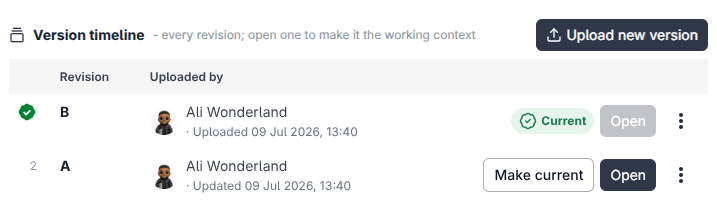
A Revision is the label a version carries: A, B, C. It is the name the site knows the issue by. You will see both side by side in the register: v2 might carry revision B.
app.fluxems.com
The Versions tab on a document details page listing v1 and v2 with their revision labels and one marked Current
The **Versions** tab: every upload, its revision label, and which one is Current.

Current: the one everyone builds from

Exactly one revision of each document is marked Current. That is the revision the project builds from. When a new revision becomes current, the old one is marked Superseded.

Nothing is ever lost

Superseded revisions stay readable in history forever. If a dispute comes up about what was issued and when, the answer is one click away.

Locking versioning

Versioning can be locked per document. While locked, no one can upload a new version. Use the Lock versioning action in the register row menu to freeze a document, and Unlock versioning to open it up again. Handy while a revision is under review.

Related articles

  • The document registerDocuments
  • Set a revision as currentDocuments
  • How fluxems is organisedGetting started

What's next?

Put the model to work.

  • Upload a new revision
  • Set a revision as current

See it on the platform

Document control

Was this page helpful?

The document registerUpload a new revision

Need help? Contact support.

See what shipped in the changelog.

Questions about pricing? Talk to sales.

Something down? Check the platform status.

Found a bug in the product? Report an issue.

Missing something? Request a feature.

On this page

  • A version is a new upload
  • A revision is the label it carries
  • Current: the one everyone builds from
  • Locking versioning
fluxems

Flux Enterprise Management System: documents, projects, people, mail and deadlines on one accountable record, in the words your team already uses.

All systems operational

Product

  • Platform overview
  • Document control
  • Review and markup
  • Project delivery
  • Bids and proposals
  • Calendar and tasks
  • Forms and checklists
  • Built-in mail
  • Change log and audit
  • Contacts

Industries

  • Construction
  • Architecture and engineering
  • Legal
  • Consulting
  • Property
  • Field services
  • Healthcare
  • Agencies
  • Manufacturing
  • All industries

Resources

  • Help Center
  • Blog
  • Pricing
  • Changelog
  • Status
  • Report an issue
  • Request a feature

Company

  • About
  • Start free trial
  • Talk to us about Enterprise
  • Contact
  • Sales
  • Support
A product ofEntrebyte Technologies
© 2026 fluxems · Flux Enterprise Management System · Johannesburg, South Africa
TermsPrivacyRefundsCookie Policy